
Inactive customer detection
Inactive Customer Detection Software to Find Customers Worth Winning Back
Your existing customers may be your biggest missed revenue opportunity. Revenow analyzes purchase history to identify customers who have stopped buying, estimate their recovery potential, and help you prioritize whom to contact first.
What Are Inactive Customers?
An inactive customer has bought from you before but hasn't purchased for a long time. Inactivity is best judged from real purchase history against clear, consistent thresholds. Revenow currently applies one standard set of rules to every customer, measured as days since the last purchase relative to the analysis reference date.
Active
Less than 60 days since their last purchase.
At risk
60 to 89 days since their last purchase: no longer active, not yet inactive.
Inactive
90 days or more since their last purchase.
Why Inactive Customers Matter
Every customer who drifts away takes their future repeat purchases with them. Often it starts quietly, with orders spaced further apart, until they stop altogether. The revenue they would have brought is easy to overlook because it never shows up anywhere.
These people already know your brand and have bought before. Re-engaging them is a different job from finding new customers: you start with real purchase history instead of a cold audience.
How to Identify Inactive Customers
- Import your historical customer transactions.
- Group the orders by customer to see each one's purchase activity.
- Measure the days from each customer's last purchase to the analysis reference date.
- Apply the 60-day and 90-day thresholds to sort customers into active, at-risk and inactive.
- Review what those customers spent before and what they could be worth.
Doing this by hand in a spreadsheet works for a few dozen customers. It doesn't scale to thousands.
How Revenow Detects Inactive Customers
Upload a CSV or XLSX export, run the analysis, and Revenow identifies inactive customers, estimates recoverable revenue and shows a prioritized list of recovery opportunities.
Three inputs matter most: a customer name or identifier, the transaction date, and the transaction revenue. Revenow detects the file format and suggests the column mapping for you to confirm.
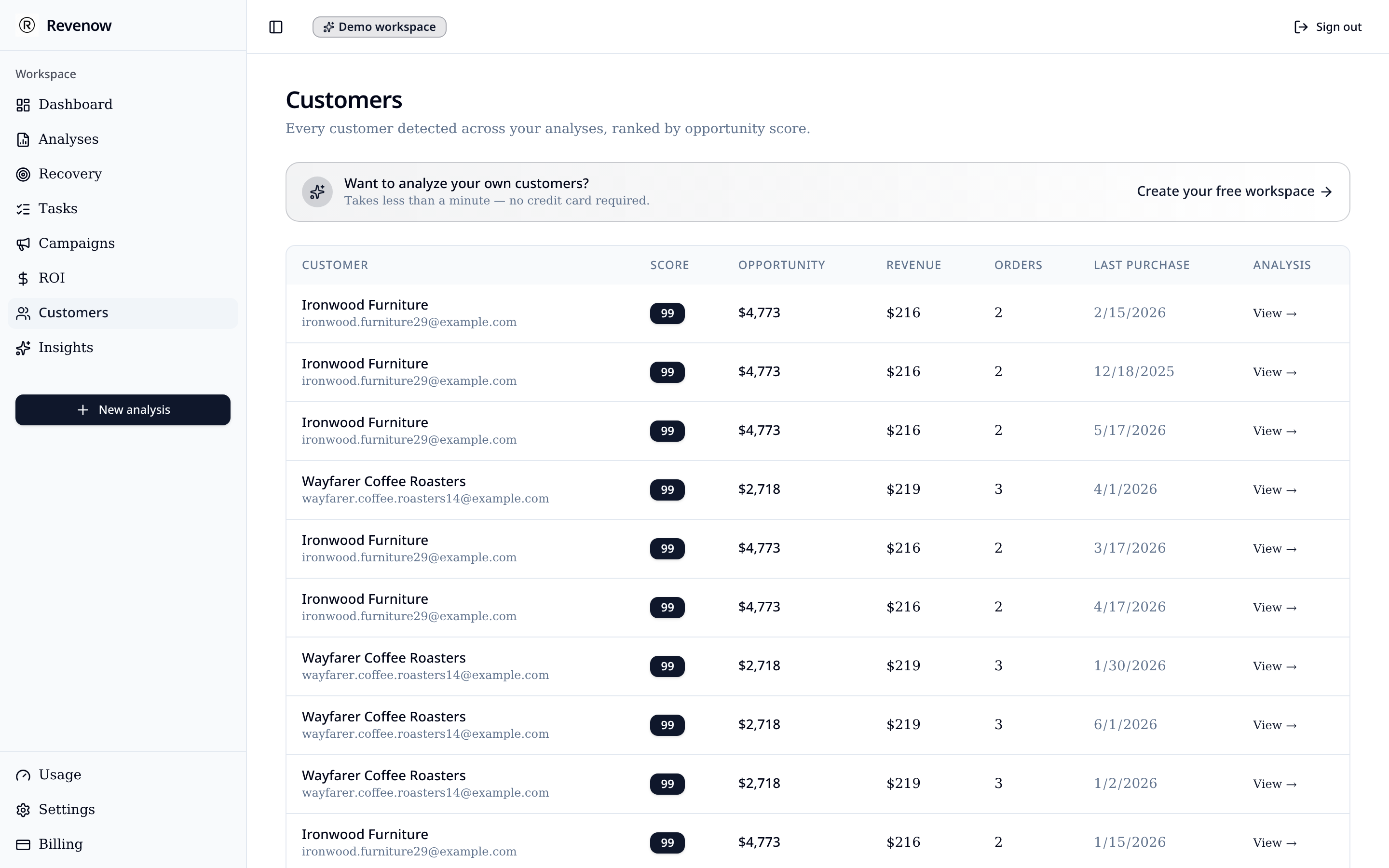
Prioritize Customers Worth Reactivating
Not every inactive customer is equally worth chasing. Revenow weighs signals such as:
- How much the customer spent historically
- How often they used to buy
- How recently they were last active
- Their estimated recovery potential
The result is a ranked list, so your effort goes to the customers most likely to matter first.
From Inactive Customers to Revenue Opportunities
Each inactive customer becomes an opportunity with an estimated value. That estimate tells you where revenue may be recoverable; it is not money that has been recovered. Revenow doesn't contact customers for you: you choose how to reach out, and any revenue comes from those actions.
Inactive customers are one part of the bigger picture. See how Revenow covers it end to end in revenue recovery software.
Who Benefits From Inactive Customer Detection?
- E-commerce stores where customers reorder products over time
- Subscription businesses with usable order or renewal history
- B2B and wholesale sellers with recurring accounts
- Service businesses with returning clients
It works best when customers buy more than once and you have several months of transaction history. Businesses built on one-off purchases will see fewer meaningful signals.
Frequently Asked Questions
What is an inactive customer?
Someone who bought from you before but has gone a long time without a purchase. Revenow currently treats a customer as inactive once 90 days or more have passed since their last purchase, measured from the analysis reference date.
How can I identify customers who stopped buying?
Measure the time since each customer's last order and compare it with a clear threshold. Revenow does this for every customer in your export at once, using the same rules for everyone.
What data is needed to detect inactive customers?
A CSV or XLSX export with a customer name or identifier, an order date and a revenue amount for each order or transaction. The longer the history, the clearer the patterns.
Can Revenow estimate potential recoverable revenue?
Yes. Each inactive customer gets an estimated value based on their past purchases. It is an estimate of what may be possible, not money that has been recovered.
How is inactive customer detection different from churn prediction?
Churn prediction tries to forecast who might leave in the future. Inactive customer detection looks at what has already happened: who has actually stopped buying, based on their recorded purchases.
Can I try Revenow before purchasing?
Yes. The demo opens a sample workspace with realistic data, no signup needed. On the Free plan you can upload your own CSV or XLSX file and see an analysis preview; reading the full report requires a one-off report unlock or a Pro subscription.
Compare plans on the pricing page or browse all solutions.